CAO Self Enabler 2027: Login, Status Check And Application Guide
CAO Self Enabler 2027. The CAO Self Enabler is an important online facility for students applying to higher education institutions through the Central Applications Office (CAO) in South Africa. It helps applicants manage important parts of their application, check progress, upload documents, and update certain personal details online.
When applying for college or university, submitting the application is only the first step. Students should also keep checking their application, making sure their documents are received, and watching for important updates. The official CAO website provides options such as Check My Application, Upload My Documents, Update My Details, and Change of Mind to help applicants manage their applications.
This guide explains the CAO Self Enabler 2027, how to log in, how to check your CAO application status, how to upload documents, and what to do if you forget your login details.
What Is CAO Self Enabler 2027?
The CAO Self Enabler is best understood as a set of online tools that allows applicants to take care of important application tasks themselves. Instead of contacting the CAO for every small update, applicants can use the online system to check and manage available parts of their application. Depending on the task, applicants can use the CAO website to:
- Check their application progress
- Upload required documents
- Update personal information
- Complete or continue an online application
- Make changes to programme choices where permitted
- Check application information
- Reset or recover login details
- Review their application history
The official CAO website currently provides dedicated options for these tasks for applicants.
Why Is CAO Status Check Important?
After submitting your application, it is important to follow its progress. A status check can help you understand whether your application is moving through the CAO process and whether further action may be required.
Stay Updated
Regularly checking your application can help you notice updates instead of waiting until the last moment. This is especially useful when the CAO or an institution needs additional documents, information, or action from you.
Avoid Missing Important Information
An application may require documents or other information before it can be fully processed. The CAO 2027 handbook states that supporting documents must be uploaded through the CAO website.
Make Better Decisions
When you know the current position of your application, you can better understand what you need to do next. For example, you may need to:
- Upload a missing document
- Correct personal information
- Check your programme choices
- Follow an instruction from the CAO
- Wait for an institution’s decision
CAO Self Enabler Login 2027
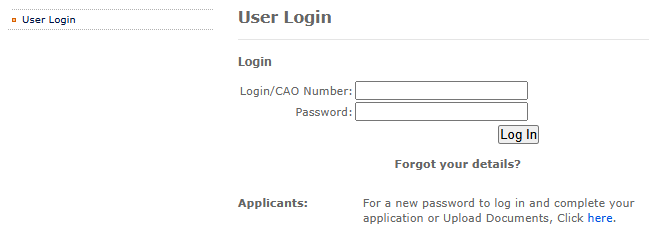
For several applicant services, you may need to log in using your CAO Number and password.
- The official “CAO login” page provides fields for Login/CAO Number and Password.
- Keep your login information safe because it may be needed to access different parts of your application.
Information You May Need
Before starting the login process, keep these details available:
- CAO Number
- Password
- ID or Passport Number when required
- Registered cellphone number
- Registered email address
The exact information required can depend on the service you are trying to access.
How to Access CAO Self Enabler
You can follow these basic steps:
- Visit the official “CAO” website.
- Look for the required applicant service.
- Select the relevant option, such as Upload My Documents, Update My Details, or Check My Application.
- Enter your CAO Number or other requested identification details.
- Enter your password if the service requires login.
- Complete any verification step shown on the screen.
- Follow the instructions provided by the CAO system.
The CAO provides separate login instructions for updating an application and uploading documents.
CAO Self Enabler for Document Upload
Uploading documents is one of the most important parts of managing a CAO application.
For the 2027 entry, the CAO handbook states that supporting documents must be uploaded through the CAO website. Applicants need their CAO number or ID/Passport number, along with access to the cellphone number or email address used on the application.
Documents You May Need
The CAO 2027 handbook lists documents that may be required depending on your situation. These can include:
- Copy of ID or Passport
- Final Grade 11 report if you are currently in Grade 12
- Highest qualification achieved
- Study or residence permit for non-South African applicants
- Proof of payment
- Signed declaration and informed consent where applicable
- June Grade 12 report
- September/Trials Grade 12 report
- Academic record or another document requested by an institution
- Power of Attorney document where applicable
The exact documents required can depend on your applicant type and the institution or programme.
How to Upload Documents Through CAO
Follow these steps to upload your documents:
1. Open the CAO Website
Visit the official “CAO” website and select “Upload My Documents.”
2. Prepare Your Files
Save your documents on your computer or another suitable storage device. The CAO says each document should be saved individually so it can be uploaded under the correct document type.
3. Log In
Enter your CAO Number or ID/Passport number and complete the required verification.
4. Select the Document Type
Choose the correct document category before selecting your file.
This is important because uploading a document under the wrong type can cause the document to appear as not received or outstanding.
5. Upload the File
Choose the correct file from your device and follow the instructions displayed on the screen.
6. Review Your Information
Before submitting, check that you have selected the correct document and entered any required results correctly.
7. Submit Your Documents
When everything is correct, select “Submit My Documents.” The CAO handbook instructs applicants to review their documents and results before final submission.
How to Update CAO Personal Details
Sometimes students need to change information on their application. The CAO provides an Update My Details option for this purpose. According to the official 2027 application information, applicants can:
- Visit the “CAO” website.
- Click “Update My Details.”
- Select the option to continue.
- Log in using the CAO Number or ID/Passport number and password.
- Select the information that needs to be changed.
- Make the required changes.
- Click “Process My Updates.”
A confirmation message should appear after the update has been processed. The CAO states that updated information is then made available to institutions.
What If You Forget Your CAO Password?
Forgetting your password does not necessarily mean that you have lost access to your application. The CAO login system provides an option for applicants who need a new password. The system can verify details such as the CAO Number, ID/Passport information, surname, and a validation code. Applicants can choose to receive a verification code through email or SMS using the contact information recorded on their application.
Password Recovery Steps
Follow these general steps:
- Open the official CAO login page.
- Select the option for a new password.
- Enter your CAO Number.
- Select the correct ID type.
- Enter your ID or Passport Number.
- Enter your surname.
- Complete the verification code.
- Select SMS or email verification.
- Follow the instructions sent to you.
- Create a new password when prompted.
The CAO also advises applicants to use the password-change function after receiving a temporary password.
CAO Password Requirements
When creating a new password, make sure it meets the requirements shown by the CAO system. The current CAO password page states that a password should contain:
- At least 7 characters
- At least one uppercase letter
- At least one special character
- At least one number
Choose a password that is difficult for other people to guess and do not share it with others.
CAO 2027 Application Tips
A few simple habits can make the application process easier.
Keep Your CAO Number Safe
Your CAO Number is an important reference number. The CAO explains that it is used for payments, correspondence, queries, and checking application progress.
Check Your Email and Phone
Use an email address and cellphone number that you can access regularly. These details may be used for communication and password recovery.
Upload Documents Carefully
Do not upload documents randomly. Select the correct document type and check your file before submitting.
Check Your Application Regularly
Do not wait until the final stage to check your application. Regular checks can help you identify issues earlier.
Follow Official CAO Information
Application rules, deadlines, programme closing dates, and requirements can differ between programmes. The CAO website should be used for the latest information.
CAO Self Enabler 2027 and Programme Choices
Applicants may also need to manage their programme choices. The CAO website includes a Change of Mind option. The CAO states that applicants with an active application can make changes to programme choices for the applicable administration fee.
Before changing your choices, carefully review the available programme information and make sure the selected course matches your interests and qualifications. Remember that programme closing dates can differ. The CAO explains that some programmes may have different closing dates, while certain programmes may not accept late applications.
Common CAO Self Enabler Problems
Students can sometimes face simple problems when using the online system.
Forgot Password
Use the password recovery option and follow the verification process.
Cannot Access Email or Phone
If the contact information connected to your application is no longer available, you may need to update your details or contact CAO for assistance.
Document Shows as Missing
First, check whether you uploaded the document under the correct document type. Incorrect document classification can cause a document to appear as not received or outstanding.
Application Is Not Complete
Log back into your application and check whether all required sections have been completed and submitted.
FAQs About CAO Self Enabler 2027
What is CAO Self Enabler 2027?
CAO Self Enabler 2027 refers to the online tools provided by the Central Applications Office that allow applicants to manage important parts of their application, check progress, upload documents, and update certain details.
How can I check my CAO application status?
Visit the official CAO website and select the Check My Application option. Enter your CAO Number or the required ID or Passport details to view your application information.
What details do I need to log in to CAO Self Enabler?
You may need your CAO Number and password to access certain applicant services. Some services may also ask for your ID or Passport Number and other verification details.
Can I upload documents through CAO Self Enabler?
Yes. Applicants can use the CAO online system to upload supporting documents. Make sure each document is uploaded under the correct document type.
What should I do if I forget my CAO password?
Use the password recovery option on the CAO login page. You may be asked to provide your CAO Number, ID or Passport Number, surname, and verification details to receive instructions for creating a new password.
Conclusion
The CAO Self Enabler 2027 can make the college application process easier by giving applicants online tools to manage important parts of their application. Instead of submitting an application and forgetting about it, students should continue checking their application progress, documents, personal details, and programme choices.